






Offline-First KMP · Part 19
Unsent Is Not Saved


Everything this series promises about your data starts once the server has it. Until then, one device holds the work, and nothing is watching it.
TL;DR Everything an offline-first design guarantees starts when the server has the event. Before that, the work is a row in an upload queue on one device, and nothing watches it. One of our iPads sat in that state for twenty-four days with every screen looking healthy. What you owe the user: a count of unsent work read from the queue itself, a count that never falls back to zero, no deleting that work without consent, and a way out that does not depend on the part that broke.
Part 19 of the Offline-First KMP series: field notes from a production winery app built on Kotlin Multiplatform (KMP).
Dropping in here? The stack: one KMP codebase for iOS and Android, with PowerSync as the sync layer in front of a Postgres backend (Part 1 is why we picked it). Every local write lands in an upload queue on the device, and our own code drains that queue by posting batches to a write endpoint.
Twenty-Four Days of Nothing Wrong
An iPad in a winery recorded 298 operations that never reached the server. For twenty-four days every screen looked normal: work showed up where it belonged and nothing reported an error. It came out only when someone on another iPad asked where the tanks an admin had set up were.
I will not say what broke, on purpose. Part 10 is a whole post about one way our sync stopped. This was a different one, and there will be others. The cause is not the lesson. The lesson is that weeks of work sat on one device and nothing in the design noticed.
The Guarantees Start at the Server
Part 2 is the foundation of this series: the projection on the phone is provisional, and that is safe because the event behind it is permanent. That holds, but only once the event is uploaded. Before that it is a row in the sync layer's upload queue, on one device, with no copy anywhere else.
Normally that window lasts milliseconds, so nobody designs for it. Nothing limits how long it can last. Ours lasted twenty-four days.
Ask the Upload Queue, Not the Sync Status
The sync client did report a status. The status was wrong. When the client stopped, its status froze at
the last values it had written: downloading true, uploading false. That reads as healthy, and it read
that way for twenty-four days while nothing moved in either direction.
A broken component that goes quiet can be detected. One that freezes on "fine" cannot. So read the amount of unsent work from the queue itself, not from what the sync layer says about itself. A self-reported status stops updating exactly when its component dies.
Count the User's Work, and Never Report Zero
"How much is waiting" has three possible answers:
One user action writes several queue rows, so the raw count overstates. Counting events alone misses entities created as a plain row with no event behind it, like a supplier added offline. The third count matches what the person actually did, and it is the number the Recovery screen shows as "entries recorded on this device".
The count reads the sync SDK's own storage format, so the read can fail. When it does, it falls back to the raw queue count, which is larger. If that fails too, the sign-out dialog says "unknown" and warns instead of reassuring. The rule: the count may be wrong upward, never toward zero. A wrong zero is the one failure this count exists to catch.
And keep one source. We had two, a cached number and a fresh one, plus code to pick which to trust. It kept picking wrong, and it showed zero exactly when work was stuck.
Signing Out Must Not Delete a Month of Work
Clearing local data drops the upload queue with it. Signing out cleared local data, and an expired session signed you out automatically. So weeks of work could vanish without anyone touching the device.
Keeping the queue on every sign-out is wrong too. Our write endpoint stamps each event with whoever is signed in when it uploads. Keep the queue across a real sign-out, and the next person on that iPad uploads the previous person's work under their own name. In an app whose job is to record who did what, that is the worse bug.
So the rule depends on who started the teardown:
- Nobody did. The session expired and there is no one to ask. Keep the data and disconnect.
- The user did. Read the count, show it, and discard only after they confirm.
- We could not count. Never treat that as zero. With nobody present, keep the data. With the user present, tell them work may be waiting rather than that there is none.
The Recovery Screen
A user whose work is missing asks one question: where did my work go? We built one screen to answer it, the Recovery screen. It holds everything that has not landed on the server, in two parts:
- Unsent: work still waiting on this device, with the count and the way out.
- Refused: work that left the device and was turned away.
Recovery, Part 1: Unsent Work
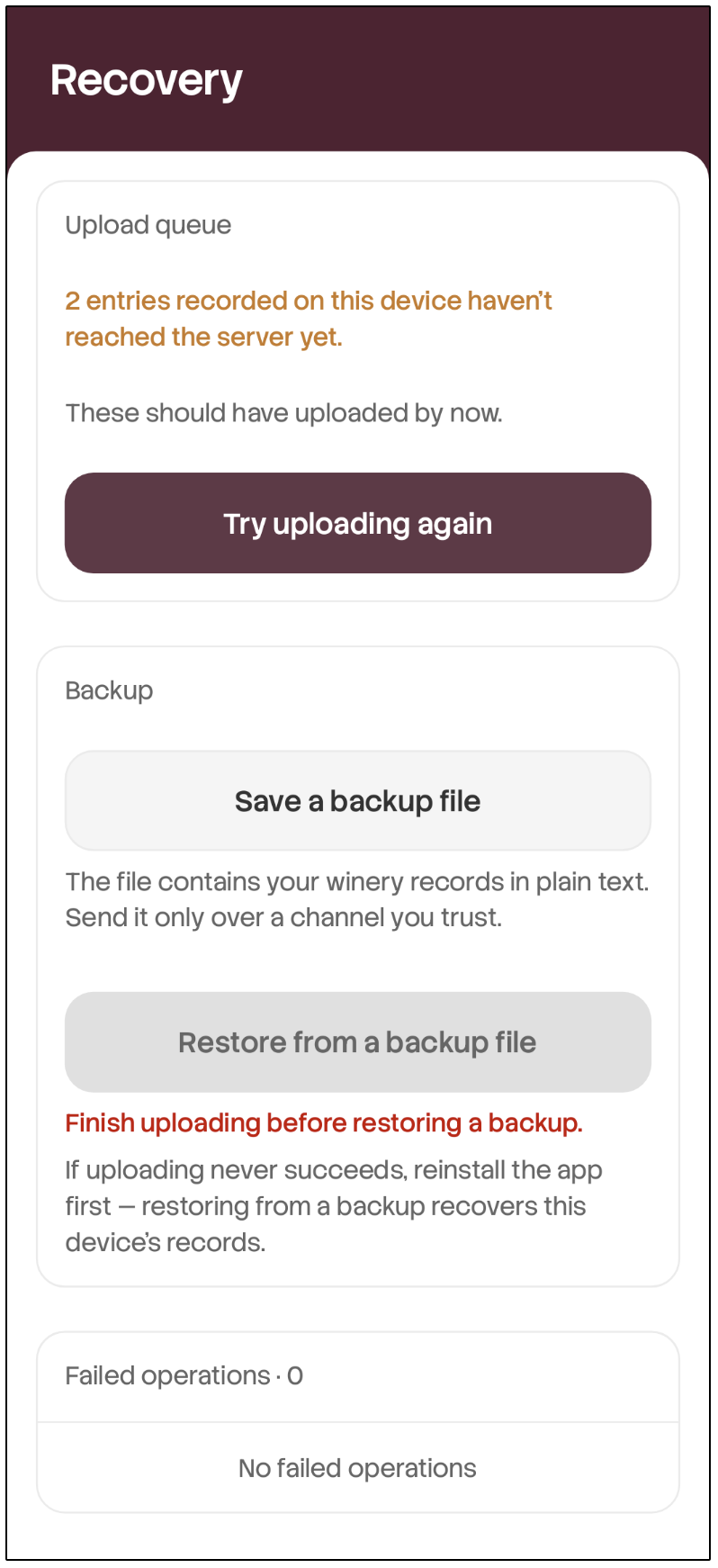
The Recovery screen shows the unsent count, a retry (Try uploading again) and an export (Save a backup file). All three must work without the part that failed. It sounds obvious, but in code the convenient component is always the one already in front of you, and that is the one that just broke. Three places we hit it:
- Connectivity. The sync layer has a
connectedflag, one line away. Use it to decide whether to show the repair button, and a device with a dead sync connection is told its work will upload on its own, while the button meant to fix that never appears. We read the network state from the device. - Retry. A plain reconnect waits for the previous sync job, which may never finish. Ours gives up after thirty seconds and shows an error, which turns an invisible freeze into something a person can read out to you over the phone.
- Export. Saving the unsent work to a backup file needs no network and no server, because a cellar with no signal is exactly where somebody needs it.
Recovery, Part 2: Refused Work
The second part of the Recovery screen lists refused work under Failed operations, from two sources, each with its own badge.
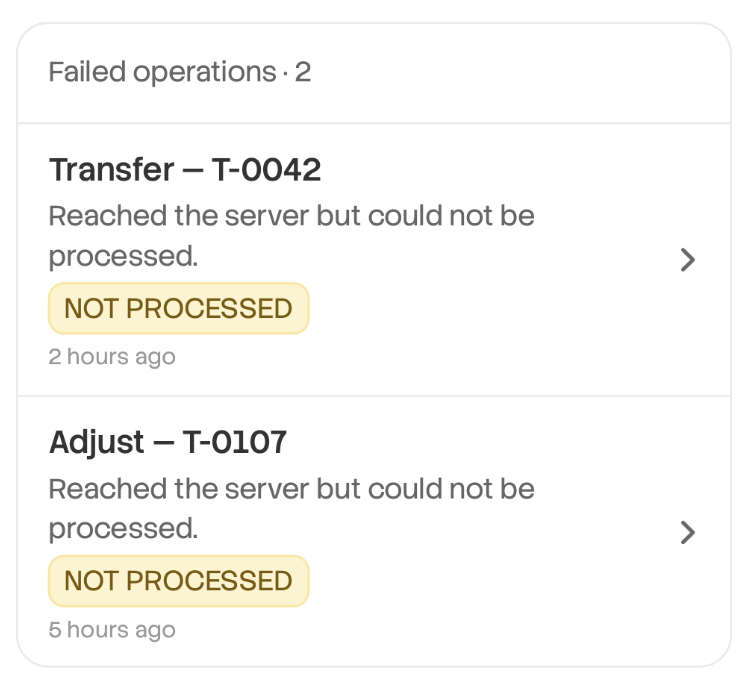
Refused by the server (Not processed, or failed validation). The event uploaded, and a rule
rejected it (VALIDATION_FAILED) or processing failed. For a long time no screen showed these, and
Part 18 is why that was data loss. Recovery now lists them.
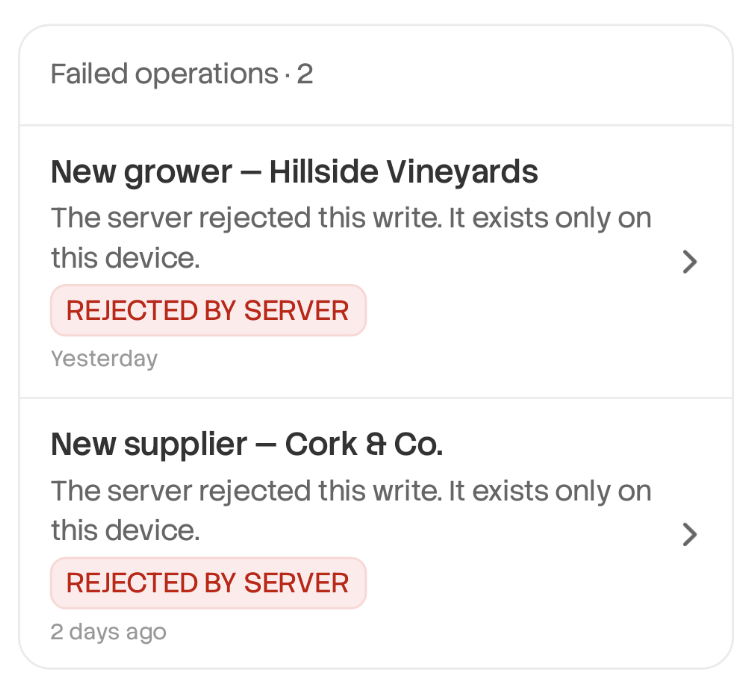
Refused at the door (Rejected by server). The write endpoint turns some writes away inside a 200.
Those used to end as a log line, which is Part 5's whole story. Now
the connector records each one on the device first, with the server's reason.
Both are visible on Recovery today; replaying them once the cause is fixed is the next piece.
The Takeaways
- Your guarantees start later than you think. Find the moment the server has the work, and look at the window before it. Nothing limits it, and it is the only place where loss is total.
- Ask the work, not the worker. Count unsent items from the queue. A component's own status freezes when the component dies.
- A count that can fail must fail upward. Larger, or unknown. Never zero.
- Consent depends on who started the teardown, not on which screen it happened.
- Give missing work one screen. Unsent and refused work in one place, so "where did my work go" has one answer.
- Build the exit from different parts than the failure. A recovery path that shares a component with the failure is unavailable at the only moment it matters.
Everything this architecture promises begins the moment the event lands. Until then, the only thing standing between a winemaker and a lost month is a screen you remembered to build.